

External Solid State Drives
- USD 0.00

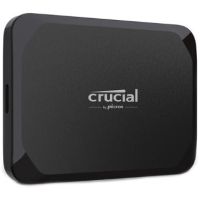
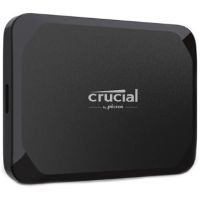
 Crucial CT4000X9SSD9 4TB USB-C 3.2 Gen 2 External SSD
 Out of Stock
Brand: Crucial SKU: CT4000X9SSD9 Condition: NEW Call us for price(669) 244-0333
- USD 0.00 Crucial CT1000X9SSD9 1TB USB-C 3.2 Gen 2 External SSDOut of Stock
Brand: Crucial SKU: CT1000X9SSD9 Condition: NEW Call us for price(669) 244-0333
- USD 0.00 Crucial CT2000X9SSD9 2TB USB-C 3.2 Gen 2 External SSDOut of Stock
Brand: Crucial SKU: CT2000X9SSD9 Condition: NEW Call us for price(669) 244-0333
External Solid-State Drives (SSDs) – Portable USB-C & NVMe SSD Storage
Market Report World reports that the shift from Hard Disk Drives to Solid-State Drives in consumer laptops and desktops has gained unprecedented momentum. The report shows that 42% of consumers shifted to SSD-based data storage in 2025, whereas the usage of HDD-based data storage declined by 12%. The reasons are obvious: faster read/write speed, energy efficiency, shock resistance, compact form factor, and less heat output, to name a few. Solid-State Drives can be both external and internal. Internal Solid-State Drives offer better speed, endurance, and performance than external hard drives; however, Internal SSDs are constrained by some serious limitations. For instance, users often struggle to cope with compatibility constraints, limited maximum capacity, difficulty in data recovery, performance degradation upon saturation, firmware vulnerabilities, and environmental sensitivities. That’s why external solid-state drives are often deployed to compensate for these limitations. Therefore, you need to understand SSD external hard drives, including their types: USB-C external SSD, NVMe external SSD, USB 3.2 external SSD, Thunderbolt external SSD. This understanding can help you buy the best external solid-state drives for video editing and other applications.
What are External SSD Drives?
Simply speaking, external Solid-State Drives are powerful and portable storage solutions that can connect to your laptop, desktop, or other devices through various interfaces such as USB, Thunderbolt, and other high-speed interfaces. These are high-speed external SSD solutions that deliver the same read/write speed as supported by internal solid-state drives but offer additional benefits of easy portability, plug-and-play functionality, mobile data backup, and compact form factor.
Types of External Solid-State Drives:
1. NVMe External SSDs:
External NVMe SSD solutions are designed to combine the blazing-fast speed of the NVMe protocol with a portable enclosure. As a result, users can experience considerably higher speed as compared to SATA SSDs, reaching 1,000–2,000 MB/s on USB 3.2 Gen 2x2 (20 Gbps) connections and 40Gbps via USB4 or Thunderbolt connections.
These external SSD compatible with Windows and Mac and are provided with a slightly larger form factor, allowing manufacturers to add other features such as heatsinks, and the like. The portable NVMe SSD for creators is also recommended for photographers, software developers, and professionals engaging in database handling, backup on high-end workstations, and the like.
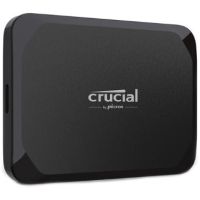
For instance, Crucial X9 4TB Portable SSD is a highly recommended and reliable external SSD for backup storage, offering plug-and-play compatibility for PC, Mac, tablet, iPad, Xbox, PlayStation, Android ad more. It also offers on-the-go durability, up to 1050MB/s read speed, and 4TB storage.
2. USB-C External SSDs:
There is no denying absolutely in saying that USB-C has become a standard and the most widely used interface in modern devices. The biggest advantage of using USB-C external SSDs is that they can work seamlessly with smartphones, gaming consoles, laptops, tablets, and the like. They also offer plug-and-play convenience as well, making them suitable for IT professionals who are often on the road.
Depending upon the underlying USB-Gen, external SSDs with USB-C connectivity come with multiple USB interfaces.
• USB 3.2 Gen 1 (5 Gbps) supporting up to 400 MB/s speed.
• USB 3.2 Gen 2 (10 Gbps) delivers up to 1000 MB/s speed, making compatible external SSDs most popular.
• USB 3.2 Gen 2x2 (20 Gbps) allows up to 2000MB/s speed, making them suitable for high-end professionals.
• USB4 (40 Gbps) supporting up to 3,800 MB/s, making them premium USB-C SSDs for 4K/8K video editors, 3D renderers, and CAD designers.
It should be noted that not all USB-C external SSDs deliver the same speed. USB-C connector is just a shape; the speed is determined by the USB version supported by USB-C SSDs and the host device.
3. Thunderbolt External SSD Storage:
Thunderbolt SSD drives are high-speed external SSDs for gaming consoles and workstations, offering ultra-fast speed for pro workers. Thunderbolt external SSD for professional workflows can deliver up to 40 Gbps of bandwidth through Thunderbolt 3 and Thunderbolt 4 connections. Thunderbolt 5 external SSDs have pushed these boundaries further, supporting up to 80Gbps speed.
These high-speed portable SSDs are suitable for professionals engaging in high-end tasks such as 4K/8K editing of ProRes footage, running virtual machines and applications directly from attached SSD drives. Users can deploy Thunderbolt external SSDs for transferring entire projects between the systems, and the like.
For example, OWC 2TB Envoy Ultra is the first and fastest Thunderbolt 5 portable SSD that features over 6000MB/s blazing speed; a fanless, heat-dissipating aluminum design; and complete compatibility with Macs, PCs, iPad Pros, Chromebooks, and Surface devices.
4. Rugged & Encrypted SSDs:
Rugged external SSDs are purpose-built external state drives that are designed for users who prefer security and durability. Rugged SSDs are therefore recommended for military and government officials, journalists, field photographers, and others who need to work under harsh outdoor conditions.
Rugged SSDs feature IP65/IP67/IP68 dust and water resistance ratings, drop/crash protection, shock-absorbing rubber bumpers, reinforced enclosure, and wide-ranging temperature & humidity resistance.
For example, the Crucial X10 Pro 1TB Portable SSD is a rugged solid-state drive that comes with water, dust, and sand resistance (IP55). It features drop resistance up to 7.5 feet/2 meters, making it a rugged portable SSD for travel and other outdoor work settings.
Key Features of External Solid-State Drives:
Undoubtedly, solid-state drives have revolutionized data storage and backup systems. They offer enhanced durability, faster read/write speed, and robust portability. External Solid-State Drives add more advantages, offering a convenient solution for expanding storage, backing up files, and improving overall system performance.
1- High-Speed Data Transfer:
High speed is one of the biggest advantages of external solid-state drives. They support a much faster data transfer rate than is supported by Hard Disk Drives. HDDs can support at max 100–160 MB/s, whereas external solid-state drives can deliver significantly higher data transfer. Users can enjoy as low as 400–550 MB/s with entry-level SSDs and as high as 2,000–6,000+ MB/s with high-end NVMe and Thunderbolt models.
Users can leverage the faster data rate of external solid-state drives to enjoy quick file transfers, seamless video editing, and faster access to large datasets. However, you need to know that the speed of portable solid-state drives is determined by the SSD’s performance, the host device's port capabilities, and the connection interface, such as USB 3.2 Gen 1, Gen 2, Gen 2x2, USB4, or Thunderbolt.
2- Compact & Lightweight Design:
This is another salient feature of external solid-state drives. SSDs feature a remarkably compact and lightweight design. An 8TB portable SSD drive can weigh 100g at max, allowing users to slip them into camera bags, fit them comfortably in pockets, and carry them around easily wherever they go. Manufacturers have managed to build small pocket-sized external SSD drives because, unlike HDDs, SSDs don’t come with spinning platters and read/write heads. Consequently, you can purchase bus-powered external SSDs, pocket-sized external SSDs, and cable-free external SSDs to meet your varying travelling needs.
3- Shock & Drop Resistance:
The fact that external SSD drives don’t come with moving parts enables manufacturers to design smaller and smaller solid-state drives. It also helps them to build data storage that is shock and drop-resistant. You don’t need to worry about read/write heads crashing into spinning heads and destroying the stored which is a normal case with HDDs.
External SSDs are provided with features enabling them to survive harsh outdoor working conditions. For instance, standard external SSDs offer up to 2m drop protection, whereas rugged SSDs can go even further, providing 3m drop protection. Similarly, they also come with IP65/IP67/IP68 dust and water resistance ratings, reinforced enclosures, and rubber bumpers. Therefore, external solid-state drives can be used for construction sites, outdoor videography, military uses, and location video shoots.
4- Cross-Platform Compatibility:
Most of the external SSD data storage solutions are provided with a USB-C or Thunderbolt interface that ensures almost universal compatibility with all types of platforms, including Windows, macOS, Linux, Android, and gaming consoles. Consequently, users enjoy plug-and-play compatibility with laptops, MacBooks, iPads & iPhones, Android devices, gaming consoles, Linux, smart TVs, and media players.
External SSD Storage Capacities: How Much Storage Capacity Do You Need in Your External SSD?
External SSD drives are available in a great variety, offering wide-ranging capacities to meet your varying needs.
• 500GB External SSDs:
500GB external SSDs are entry-level solid-state drives, representing a perfect balance between price and performance. 500 GB external solid-state drives feature a compact design and USB-C interface with speeds reaching 500-800 MB/s. This storage is enough for storing 24 hours of 4K videos, 10-15 large PC games, 125,000 high-resolution photos, 125 hours of HD video, or about 50 full HD movies.
These are affordable external SSDs that are preferred by students doing coursework, travelers needing lightweight external data storage, and casual users who need an affordable external SSD for a portable backup drive for documents and photos.
• 1TB External SSDs:
1TB external solid-state drives are normally considered the sweet spot, making them suitable for most of the users at a price that has become increasingly affordable over the years. 1TB external SSDs represent a balance between price, portability, and capacity. You can deploy this storage to store 250,000 high-quality photos (12MP), roughly 500 hours of HD videos, 20-30 modern console/PC games, 50 hours of 4K videos, and the like.
1TB external SSD drives are recommended for small businessmen who need storage for storing client files; gamers who need to expand console storage; content creators who have to handle regular videos; and photographers who need storage for their growing photo libraries.
• 2TB External SSDs:
2TB portable SSDs are for demanding workflows, making them suitable for power users, photographers, and video editors who need to store or move large game libraries and 4K video projects. 2TB external SSD storage can help you store 40-60 PC games, 100 hours of 4K videos, 400,000 plus photos, and the like.
2TB external SSDs are recommended for 4K video editors, gamers who maintain extensive gaming libraries, small studios, and photographers shooting raw formats.
• 4TB & Higher Capacity SSDs:
4TB portable SSD drives are high-end SSDs that are workstation-grade and built in a pocket-sized form factor. Normally, 4TB external solid-state drives are the ultimate high-capacity storage for consumers;
however, 8TB external solid-state drives and 16TB solid-state drives are also considered premium external SSD solutions. What’s more, top-tiered 4TB external SSDs can support up to 00–2000 MB/s and even up to 4000 MB/s on USB4/Thunderbolt‑based models.
Top External SSD Brands:
• Samsung
• Western Digital (SanDisk)
• Seagate
• Kingston
• Kioxia (Toshiba)
• Crucial (Micron)
• ADATA
• SK Hynix
• Lexar
• Sony
Why Buy Storage Devices from Kijero:
Kijero has carved out a unique name in the IT market for offering an extensive range of storage devices, including Solid State Drives, Hard Drives, Flash Drives, Tape Drives, and accessories such as Drive Trays. We have been a trusted partner of 50-plus leading manufacturers, including but not limited to Synology, QNAP, Lenovo, Axis Communications, to name a few.
Contact us today to upgrade your storage at the best price in the market.
Featured Products