

VGA Adapter
- USD 19.34

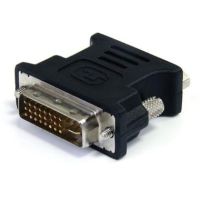
 StarTech 10 pack DVI Male to VGA Female Adapters Black - DVI...
 In Stock
Brand: StarTech SKU: DVIVGAMFB10P Condition: NEW USD 19.34 - USD 21.49 StarTech DisplayPort to VGA Adapter - DP2VGA3 In Stock
Brand: StarTech SKU: DP2VGA3 Condition: NEW USD 21.49 - USD 31.52 StarTech DisplayPort to VGA Adapter with Audio - DP2VGAA In Stock
Brand: StarTech SKU: DP2VGAA Condition: NEW USD 31.52 - USD 106.67 StarTech 5-Pack DisplayPort to VGA Adapter - DP to VGA Activ... In Stock
Brand: StarTech SKU: DP2VGA3X5 Condition: NEW USD 106.67 - USD 126.23 StarTech High Resolution VGA to RCA Adapter for PC to TV - V... In Stock
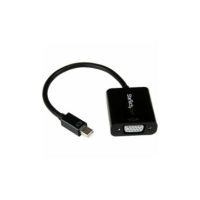
Brand: StarTech SKU: VGA2VID Condition: NEW USD 126.23 - USD 0.00 StarTech Mini DisplayPort to VGA Adapter Dongle - Active mDP...
 Out of Stock
Brand: StarTech SKU: MDP2VGA2 Condition: NEW Call us for price(669) 244-0333
- USD 0.00 StarTech Mini DisplayPort Male to VGA Female Adapter with Au...Out of Stock
Brand: StarTech SKU: MDP2VGAA Condition: NEW Call us for price(669) 244-0333
- USD 0.00 StarTech DVI-I Male to VGA Female Adapter (Black) - DVIVGAMF...Out of Stock
Brand: StarTech SKU: DVIVGAMFBK Condition: NEW Call us for price(669) 244-0333
- USD 0.00 StarTech DVI-I Male to VGA Female Adapter (Beige) - DVIVGAMFOut of Stock
Brand: StarTech SKU: DVIVGAMF Condition: NEW Call us for price(669) 244-0333




Buy VGA Adapters – HDMI, DisplayPort, DVI to VGA Converters Online
Are you looking to connect modern laptops with older projectors? Are you struggling to hook up retro gaming consoles and legacy PCs to modern displays? Are you worried that your newly-bought Graphics Cards feature HDMI and DisplayPort connectors, but your existing monitor accepts only VGA? Don’t Worry at all. A right VGA adapter can help you address all of these problems. VGA video adapters is a type of video adapter that connects modern devices featuring HDMI, DisplayPort, and USB-C connectors and legacy devices supporting only VGA connectors. You can thus make sure that source devices, such as laptops, computers, and gaming consoles, can interact and exchange video signals with display devices such as projectors, monitors, and TVs that don’t have compatible ports. Video Graphic Array or VGA converters come in various types, including HDMI to VGA adapters, VGA to HDMI converters, DisplayPort to VGA adapters, DVI to VGA adapters, and USB to VGA adapters. They perform various types of video signal translation, conversion, and physical rerouting, making the VGA display adapter suitable for various applications.
Let’s discuss these types of VGA video adapters in depth so that you can purchase the best VGA adapter for a monitor, TV, or projector.
Types of VGA Adapters:
VGA adapters can be arranged in several groups depending on the video signal conversion that they can perform.
1- HDMI to VGA Adapters:
As the name indicates, the HDMI to VGA adapter is an external hardware device that converts digital signals coming from HDMI devices into analog signals acceptable by older projectors, monitors, and TVs that feature only a VGA connector.
The working method of laptop VGA adapters is simple. They connect HDMI devices with VGA devices. Video signals from HDMI connectors/ports are fundamentally different from analog signals acceptable for the VGA connector. To address this problem, HDMI-to-VGA adapters are provided with a digital-to-analog conversion chip that performs three tasks. First, they accept digital signals from the source device. Second, they decode the digital signals, and finally, analog RGB signals through the 15-pin VGA connector.
Here are some salient features of HDMI to VGA adapter for laptop, desktop, and gaming console.
• Design of HDMI to VGA or VGA to HDMI adapters:
The standard HDMI to VGA adapters comprises multiple parts. You will have a male HDMI connector on one end that is plugged into the source device. The source device can be a streaming stick, desktop, laptop, or gaming console that features an HDMI port. On the opposite end of this PC VGA adapter, you find a female VGA port.
Since VGA adapters don’t support audio signals, the HDMI to VGA video converter also features a 3.5mm audio jack to output sound separately.
You can also find HDMI to VGA adapters featuring micro-USB or USB-A power input, which some adapters may need for a power source, especially those adapters that are deployed for high-resolution.
• Where to use the HDMI to VGA Video Converter:
There are multiple applications where you should apply this PC VGA adapter to meet your specific needs.
You can use this laptop's VGA adapters for connecting modern HDMI laptops with VGA classroom projectors or older conference rooms.
Users can deploy this adapter for connecting an HDMI-equipped PC or laptop with an old VGA monitor, creating a multi-monitor setup and extending the lifespan of their PCs.
Gamers can connect HDMI-bearing gaming consoles with VGA monitors. Furthermore, streaming devices such as Ruko, Fire Stick, Chromecast can be paired with old VGA-equipped TVs or displays.
• Resolution & Refresh Rate:
The resolution supported by HDMI to VGA adapters caps at 1920×1080 with a refresh rate hovering around 60Hz. These adapters are therefore not suitable for a high refresh-rate gaming setup.
2- DisplayPort to VGA:
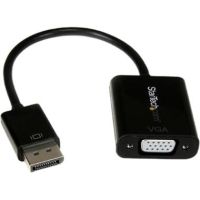
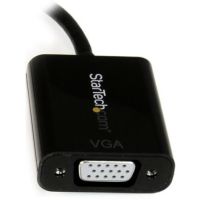
Similar to HDMI to VGA adapters, DisplayPort to VGA video adapters have also found wide-scale applications across domains and niches. DisplayPort to VGA adapters allow users to connect the DisplayPort output on GPUs, workstations, laptops, and PCs to any VGA-enabled monitor, projector, or TV.
The working method of the DisplayPort to VGA video converter is very similar to what an HDMI to VGA adapter does. They take digital video signals from DisplayPort-enabled devices, and a Digital-to-Analog chipset converts these digital signals into analog ones, acceptable for older VGA devices.
You can find various variants of DisplayPort to VGA adapters for PC, including Mini DisplayPort to VGA adapters. Mini DisplayPort to VGA video converters is deployed for certain Thunderbolt 1 and 2 ports, older Apple devices, and Microsoft Surface tablets.
• HDMI to VGA Vs DisplayPort to VGA Adapters:
DisplayPort to VGA video adapters is different from HDMI VGA adapters in a way that DP to VGA adapters draw power directly from the DP port. Unlike HDMI VGA adapters, the requirement for external power for DisplayPort to VGA signal conversion is extremely rare.
Both of these adapters differ considerably when it comes to handling audio signals. HDMI to VGA adapters is provided with a 3.5mm audio jack; however, DP to VGA adapters don’t come with a similar feature.
• Resolution and Refresh Rate:
Most DisplayPort to VGA video adapters supports up to 1920×1200 resolution with up to 60Hz refresh rate. However, as compared to HDMI to VGA converters, DP VGA adapters offer cleaner and more consistent power, making the DisplayPort to VGA adapter for PC suitable for business and workstation use with cleaner signal handling.
• Active Adapters vs Dual-Mode DisplayPort (DP++) Passive Adapters:
Since DP to VGA adapters carry out digital-to-analog video signal conversion, they are active and can support any source device having a DisplayPort connector. Active DisplayPort to VGA adapters are universally compatible on any device, including desktops, workstations, laptops, and docking stations. They are also fully compatible with Windows, Linux, and other major operating systems.
The Dual-Mode DisplayPort (DP++) feature is an important consideration that you need to check. If the connector of a video source, say a DisplayPort on a laptop, supports DP++ mode, it can itself perform video conversion. Consequently, you don’t need to purchase an active adapter; a passive video adapter can perfectly meet your needs.
However, it should be noted that all DisplayPort to VGA adapters are active. DisplayPort to HDMI and DisplayPort to DVI adapters can be either passive or active.
In short, active video adapters feature a dedicated digital-to-analog conversion chip, and passive video converters don’t come with any such chipset.
3- DVI to VGA Adapters:
A DVI to VGA video adapter is another video adapter that is designed to connect a DVI (Digital Video Interface) connector to a VGA-enabled monitor, TV, or projector. DVI to VGA adapters are passive video converters because some DVI variants produce analog video signals that are compatible with the VGA interface. Therefore, DVI to VGA video converters are considered the most affordable and inexpensive VGA adapters for projector connection and other applications.
However, it should be noted clearly that not all DVI connectors support analog video signals. There are certain DVI connectors that support digital signals. Understanding different types of DVI connectors can help you make a well-informed decision on which DVI to VGA adapter best serves your needs.
Types of DVI Connectors:
• DVI-D: Digital-Only Connector:
DVI-D connectors support digital-only video signals, making them suitable for modern devices. DVI-D connectors are available in two formats: single-link and dual-link. The Dual-Link DVI-D interface can support up to 2560x1600 resolution, whereas the Single-Link connector can deliver up to 1920x1200 resolution. Moreover, the Dual-Link DVI-D connector features 24 digital pins + 1 flat pin configuration, whereas the Single-Link connector supports 18 digital pins + 1 flat pin configuration.
• DVI-A: Analog-Only Connector:
A DVI-A connector can transmit analog signals only. They are not widely integrated in devices; however, they are still a useful connector to connect older and legacy monitors. DVI-A compatible devices don’t support higher resolution.
• DVI-I: Integrated Digital and Analog Connector:
DVI-I connectors combine both analog and digital video transmission. They are suitable for setups where you find both modern and legacy monitors and other devices. DVI-1 to VGA adapters are also available in Single-Link and Dual-Link formats, supporting as high as 2560x1600 in dual-link mode.
• Resolution Support and Refresh Rate:
These VGA adapters can support up to 1920×1200 resolution at a 60 Hz refresh rate. The image quality is comparatively better as these video adapters don’t perform conversion that is normally associated with HDMI to VGA and DisplayPort to VGA adapter conversion.
4- USB to VGA Adapters:
USB to VGA video converter allows users to drive a VGA-equipped monitor, projector, or TV through USB ports. Under this broader category, you can find two types of USB to VGA adapters:
• USB-A to VGA Adapters:
USB A to VGA video adapters allow users to connect between VGA monitors and any PC or Mac with a USB Type-A port. The USB-A can be of various generations. For instance, USB 2.0 or higher Type-A Gen. These adapters come with a Display Link chipset that can support up to 1920x1080 (1080p).
Moreover, they are plug-and-play adapters, compatible with Windows and macOS, and require no drivers.
• UBS-C to VGA Adapters:
USB-C to VGA video adapters is designed to convert an available USB-C port into a VGA display adapter. Users can connect any MacBook, Windows laptop, or ChromeOS device with USB-C connectors with a display, projector, or TV with VGA input.
These video adapters allow users to mirror their primary display, and they can double their workspace. They can support up to 1920x1080 resolution at a 60Hz refresh rate. You can also purchase a USB to VGA adapter for dual monitor settings and other applications.
• The Critical Compatibility Requirement for USB-C to VGA Adapters:
Users can understand that not all USB-C connectors are the same. Ideally, USB-C ports are designed to handle charging, data transmission, audio, and display. However, not all USB-C ports perform these tasks. Some can transmit data only, some can charge exclusively, and others can send videos to monitor.
DisplayPort Alt Mode (DP Alt Mode) of the USB-C port is therefore a very critical feature. DP Alt Mode enables UBS-C ports to transmit video signals using DisplayPort protocols to monitor. When it comes to USB-C to VGA adapters, DP Alt Mode makes sure that video signals are transmitted from the USB-C connector, and video adapters then convert these signals to analog ones acceptable by VGA monitors, projectors, TVs, and other entertainment systems.
USB-C Ports That Typically Support DP Alt Mode?
• Thunderbolt 3, 4, and 5 ports
• USB-C ports are now made part of tablets, 2-in-1 devices, and modern laptops.
Key Features to Consider in VGA Video Adapters:
Here are some key features that you need to know.
1. Resolution:
Resolution is the first and foremost consideration, requiring your thoroughly take this feature into consideration before you purchase the VGA adapter. Concerning this,
You need to at least aim for native 1080p (1920×1080) support if you are going to engage in office work, coding, or multitasking.
You should also make sure that the source device comes with HDMI 1.4 and DisplayPort 1.2, as these video interfaces can support 1080p resolution.
However, you can also aim at 1080p+ (1920×1200, 1600×1200) resolution because some premium VGA adapters support this higher level of resolution.
2. Plug and Play Support
This is another important consideration. Plug-and-Play VGA adapters ensure that you don’t need to install drivers or perform configuration. Plug-and-Play adapters are normally OS-agnostics and they work immediately with Windows, macOS, or Linux without extra drivers.
Here are some VGA adapters that are well-known when it comes to plug-and-play support.
• HDMI to VGA active adapters
• DisplayPort to VGA adapters
• DVI-I to VGA passive adapters
• USB-C to VGA adapters using DP Alt Mode
3. Power Requirement (Active Adapters):
The power requirement of the active VGA adapter should also be given serious consideration. If active VGA video adapters are supplied with insufficient power, users experience multiple problems, including reduced resolution, flickering, intermittent signals, and worse no image at all on the VGA projector or monitors.
Active VGA adapters draw power from multiple sources. For instance, some adapters rely upon HDMI, DisplayPort, or USB-C ports, and they don’t need an extra power source at all. There are also some VGA adapters that come with separate micro-USB or USB-A cables that are either plugged into an extra USB-A port, USB power adapter, powered USB hub, or power bank for mobile setups.
4. Build Quality and Durability
When it comes to build quality, you need to consider multiple things such as connector quality, cable quality if the adapter is cable-style, brands, and warranties.
Connectors of a VGA video converter are the most stressed part. Therefore, you need to check that the VGA connector pins are properly aligned. Thumbscrews are robust enough to lock the connector securely without stripping. More importantly, you need to ensure that the other end of the VGA adapters, such as HDMI, DisplayPort, or USB-C, can be plugged securely into the source device without looseness or tightness.
For cable-styled VGA adapters, cable quality is extremely important. In this regard, look for braided nylon or quality PVC as jacket material, proper shielding, optimum thickness, and smooth flexing of cables without kinking.
You must make sure that Conversation Chipsets are manufactured by a trusted brand, for instance, DisplayLink, Realtek, and Parade are normally considered the best chipset manufacturers.
Finally, you should purchase VGA adapters from established brands. For example, StarTech, Cable Matters, Anker, Pluggable, and Belkin are well-known names in the VGA adapter market, offering top-quality adapters to meet users' varying needs.
Top Brands Available:
Here are some brands that have carved out a trusted name when it comes to buying top VGA adapters online in the USA and beyond.
• StarTech
• Tripp Lite
• Belkin
• Dell
• Lenovo
Featured Products
Ubiquiti Networks UniFi 48-Port Gigabit PoE+ Compliant Managed Switch Call us for price
(669) 244-0333